The unified AI workflow platform that bridges automation and intelligence. Build reliable workflows, share with a community, and use AI thoughtfully - with full transparency and control.
No per-task fees. Bring your own API keys. Run local AI with Ollama. No vendor lock-in.
FlowDot is an AI workflow automation platform that lets you build, run, and share AI-powered workflows without coding. A workflow is a series of connected nodes that process data step-by-step. Use a visual drag-and-drop editor to connect AI models (ChatGPT, Claude, Gemini, Ollama) with integrations, then share your workflows as simple dashboards anyone can use.
Key differentiators: No per-task fees • BYOK (Bring Your Own Key) for 30+ LLM providers • Run local AI with Ollama for free, private execution • MCP integration with 80+ tools for Claude Desktop/Cursor • FlowDot CLI - terminal agent with code tools • Recipe Editor for multi-step agentic orchestrations • Community voting and forking.
AI today has serious issues that hurt individuals, businesses, and society. We're building the alternative.
Raw AI outputs are unreliable and inconsistent. You have to fact-check everything, wasting time and eroding trust.
When big tech adds AI features, you can't see how they work, customize them, or learn from them. You're locked in.
AI is being used to cut jobs instead of empowering workers. Productivity gains flow to the top, not to you.
Most platforms charge per task. A 10-step workflow costs 10x more. Complex automations become prohibitively expensive.
Tied to one AI provider? One ecosystem? When your tools dictate which AI you can use, you lose flexibility.
Powerful tools require coding. Simple tools lack power. Why choose between accessibility and capability?
Don't trust raw AI outputs. Trust workflows that humans designed, tested, and refined.
Same inputs always produce same outputs. No more rolling the dice with each AI request.
Every step is visible and traceable. See exactly what happened and why.
Workflows improve over time as the community shares, votes, and builds on each other's work.
Technical users build workflows. Everyone else uses simple dashboards. One platform for both.
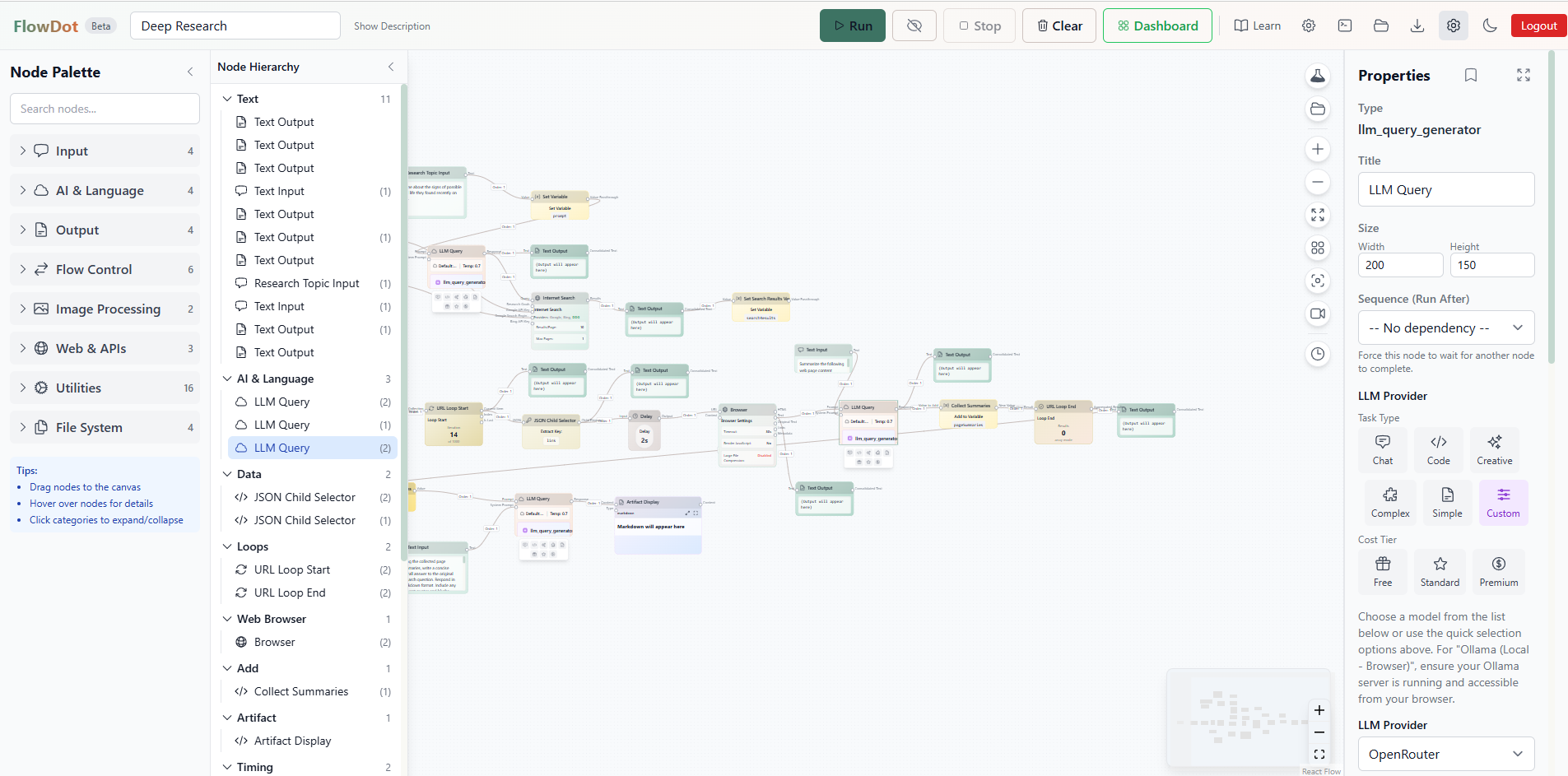
Create sophisticated AI workflows with professional-grade tools.
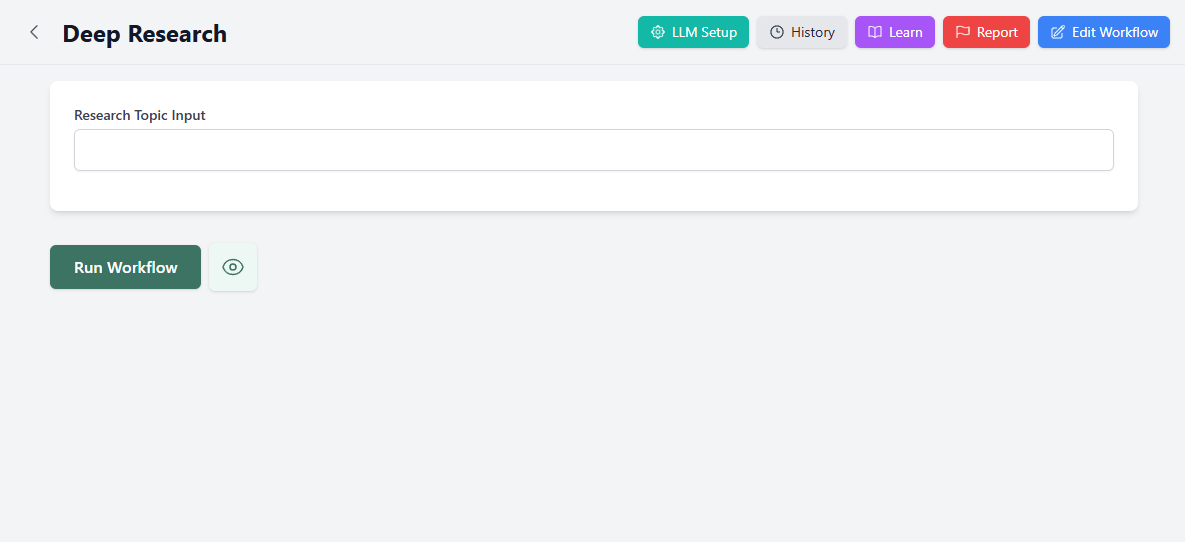
Complex workflows become simple forms anyone can use.
Capabilities that redefine what a workflow platform can do.
Traditional automation tools lack AI. AI workflow builders lack integrations. FlowDot delivers both in one platform.
Build in the visual editor. Share as simple dashboards. One workflow, two experiences for different users.
"What's the weather?" then "Post it to Discord" then "Create an image." Chain workflows through natural conversation.
Upload PDF, DOCX, TXT, MD, CSV, JSON. 3 embedding providers. Hybrid search combining keywords + semantic meaning.
Use workflows directly in Claude Desktop and Cursor. List, execute, and chain workflows from your AI assistant.
Build React micro-apps that invoke workflows. Monaco editor, AI code generation, live preview, public gallery.
Upvote workflows, apps, custom nodes, results. Nested comment threads. Quality rises through collective curation.
Clone any public workflow or app. Full ancestry tracking up to 10 levels. See the evolution of any creation.
Publish any execution as a public page. Auto-generated Open Graph images. View counts, voting, optional expiration.
Share input presets. Vote on the best inputs. Compare LLMs with standardized community test inputs.
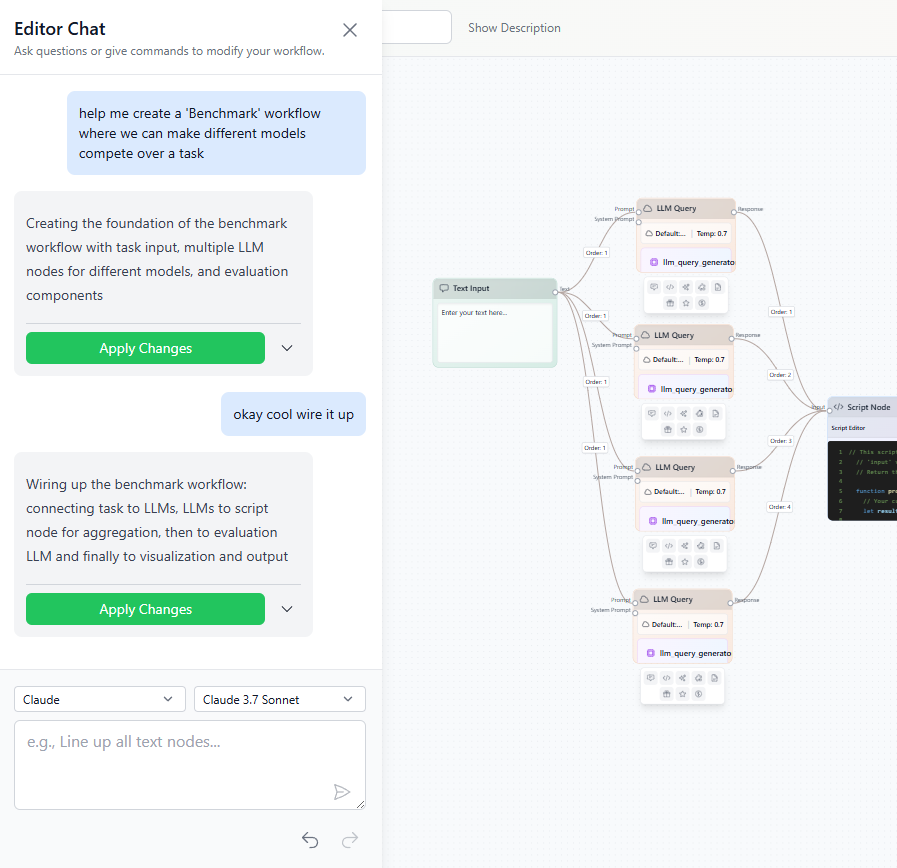
AI in the workflow editor, app editor, custom node creator, and dashboard. AI assistance built into every part.
OpenAI, Claude, Gemini, Mistral, Groq, Ollama, OpenRouter, xAI, and more. Mix providers in one workflow.
Bring your own API keys with zero markup. Run completely local with Ollama for free, private, offline AI.
Watch workflows execute node by node. See inputs, outputs, timing for every step. Full execution history.
Bundle HTTP endpoints and workflows as callable tools for agents. OAuth with auto-refresh. Credential mapping. Public marketplace.
Design multi-step agentic orchestrations with 6 step types: Agent, Loop, Parallel, Gate, Branch, Invoke. Typed stores for state.
7 search providers: DuckDuckGo, Google, Bing, Brave, SerpAPI, Serper, Reddit. Agent auto-chains searches and fetches.
AI remembers your preferences across conversations. Auto-extraction of facts and behaviors. Manual create/edit/delete with undo.
Share workflows, toolkits, and knowledge bases within teams. 6 role-based permission levels. Private, public, team visibility.
Cron-like scheduling for workflow invocations. Server-side execution runs automatically without CLI.
Bring your own keys for TTS/STT providers: OpenAI, ElevenLabs, Fish Audio, Cartesia. Same zero-markup model.
Integrate with the services you already use.
 Discord
 Slack
Slack
 GitHub
 Figma
Figma
 Jira
Jira
 Trello
 MS Teams
A powerful command-line agent that runs locally on your machine with full file access and recipe execution.
Run flowdot "your request" for one-off tasks. Interactive chat with flowdot chat. Persistent conversations you can resume.
Search, read, analyze, edit, and create files. Execute shell commands with permission. Find symbol definitions across your codebase.
Run recipes locally with file access. Link recipes with aliases: flowdot my-alias "task". Human approval gates with 5 response options.
Bidirectional CLI ↔ Telegram/Discord. Approve permissions from your phone. CLI output mirrors to chat. Commands flow both ways.
5 response options: Yes (now), Yes (session), Yes (forever), No (now), No (banned). Category-based controls for commands, reads, writes.
Recurring tasks: flowdot loop 5m "task". Background daemon survives terminal close. Inbound commands from mobile.
npm install -g @flowdot.ai/cli
FlowDot everywhere you work - desktop and mobile native experiences.
All CLI features in a native GUI. Visual recipe monitoring. Integrated code editor. Local file management. Cross-platform Electron app.
Trigger workflows from mobile. Monitor executions. View results. COMMS integration for approvals. Rich notification buttons.
Complete privacy and transparency. We believe you should own your AI experience.
Use your own API keys from any provider. You control costs, access, and everything.
Run AI models entirely on your computer. Zero cloud dependency, complete privacy.
See every parameter, prompt, and setting. No hidden behavior, no black boxes.
Your data is yours. Export it, delete it, control it. We don't sell your data.
We believe in transparency about AI's environmental impact.
See energy consumption per model. Make informed choices about which models to use.
Understand the carbon footprint of your AI workflows. Choose efficient when it matters.
Run AI locally with Ollama for minimal environmental impact and maximum privacy.
We believe AI should help individuals do more, not get replaced. FlowDot puts professional-grade AI tools in your hands.
Share, learn, and build on each other's work. Not just static templates - a living community.
Best workflows rise to the top
Take any workflow and make it yours
Share input configurations
Discover top builders
What you get with FlowDot that others don't offer.
| Feature | FlowDot | Others |
|---|---|---|
| Unified Automation + AI Platform | Yes | No |
| Dual-View (Editor + Dashboard) | Yes | No |
| Conversational Workflow Chaining | Yes | No |
| CLI Agent with Code Tools | Yes | No |
| Recipe Editor (Agentic Orchestration) | 6 Step Types | No |
| Agent Toolkits with OAuth | Yes | No |
| Knowledge Base / RAG | Native | Limited |
| MCP Integration (80+ Tools) | Yes | No |
| Apps Platform | Yes | No |
| Community Voting & Comments | Yes | No |
| Fork with Lineage Tracking | Yes | No |
| Agent Memory System | Yes | Limited |
| Research System (7 Providers) | Yes | 1-2 |
| Teams & Collaboration | 6 Roles | Limited |
| Multi-LLM Support | 30+ Providers | 1-3 |
| BYOK + Local AI (Ollama) | Yes | Rare |
| Audio BYOK (TTS/STT) | 4 Providers | No |
| Custom Nodes (JavaScript) | Yes | Limited |
| Scheduled Tasks (Cron) | Yes | Limited |
| COMMS Relay (Telegram/Discord) | Yes | No |
| Shareable Results + OG Images | Yes | No |
| Input Presets Marketplace | Yes | No |
| Energy Transparency | Yes | No |
| Per-Task Fees | None | Yes |
See detailed comparisons with specific platforms:
View All 24 ComparisonsWe're building FlowDot based on values we believe matter. We want AI to help people, not harm them.
We show you everything - energy costs, model behavior, execution logs. Even when the truth is ugly.
Professional tools shouldn't be locked behind enterprise pricing. BYOK and Ollama make AI accessible to all.
AI should help you do your job better, not take your job away. We build for career growth.
Share workflows, vote on quality, build on others' work. We all benefit when we share knowledge.
The best results come from human intelligence guiding AI power. Not black boxes, not slop.
Your data is yours. BYOK, local AI, encrypted storage. We don't sell your information.
Join a community building reliable, transparent AI automation. Start free with your own API keys or Ollama.
Have questions? Check our comprehensive FAQs or contact support.
